
HoneyBook Review for Photographers – My Honest Experience After 9 Years
I started using HoneyBook early in my photography business, when my needs seemed relatively simple. I wanted a better way to send contracts, issue invoices, collect payments, and keep track of client projects.
Before that, I was doing all of this with paper contracts, cash, checks, spreadsheets, and Word documents. I would meet clients in person for signatures or send paperwork through the mail. It technically worked when I only had a small number of clients, but it was inefficient and difficult to scale. These days, I can’t imagine working like this especially with a more modern and tech savvy customer base.
I have now used HoneyBook consistently for roughly nine years at the time of writing this. During that time, my wife and I have photographed hundreds of weddings and hundreds more engagement, portrait, and family sessions. Virtually every lead and booked client in our business has passed through and been managed in HoneyBook in some form.
This HoneyBook review for photographers is based on that long-term experience, not a quick free trial or a feature list pulled from a sales page.
Interested in trying Honeybook yourself? Use my link to try it for free, and if you like it enough to join a paid plan, take 30% off.
My Quick Verdict: Is HoneyBook Good for Photographers?
The short answer is…yes! I believe HoneyBook is one of the better client-management platforms available for solo photographers, partnered teams (like my wife and I), and small photography studios.
Its strongest quality is not any one feature.
It is the way its contact forms, project pipelines, email templates, schedulers, proposals, contracts, invoices, questionnaires, payments, and automations all work together to create a seemless system for managing leads and client projects.
HoneyBook has made my photography business easier to organize and considerably more efficient. It gives me one central place to manage leads, communicate with clients, secure bookings, collect information, and keep projects moving forward.
While it’s easy for me to rave about all the good in Honeybook and how it’s made running my business easier, I’ll also be the first to admit it’s not perfect (no software is). A few things that I’ll bring more attention to later in this article will include the fact the initial setup can feel dense, Smart Files require time to build well (and can be a little frustrating to use), some financial features overlap with dedicated bookkeeping software and don’t feel like a great use of resources, and its team controls may be a little too limited for larger studios. But more on these things later…
Even with some downsides, I still think this is a really solid CRM for photographers.
My overall verdict is pretty straightforward:
HoneyBook is a strong fit for photographers (and other creative businesses) who regularly manage inquiries and paying clients, especially solo photographers and small teams. It may be unnecessary for someone who has not begun booking clients yet, and it deserves closer evaluation if you operate a larger company with numerous employees or contractors.

With all that said – let’s now dive into the heart of this Honeybook review to help you learn more about the platform!
What Is HoneyBook?
HoneyBook is a client relationship and business-management platform for independent service businesses.
For photographers, it can bring together many of the tasks that occur before and after someone books:
- Capturing inquiries
- Organizing leads
- Sending emails
- Scheduling consultations
- Sharing services and pricing
- Sending proposals
- Collecting contract signatures
- Creating invoices
- Processing payments
- Sending questionnaires
- Managing project stages
- Automating routine communication
The reality is, you could handle many of these tasks through separate services. A contact-form plugin could capture leads. Calendly could handle scheduling. DocuSign could send contracts. An invoicing platform could collect payments. Google Forms could manage questionnaires…
HoneyBook’s value is that these functions can operate within the same client and project record. As long as the features work well and seemlessly with one another, it makes a much stronger value proposition.
For a broader introduction to the Honeybook platform, you can also check out our page: HoneyBook for Independent Businesses.
With that said, let’s continue on with this Honeybook review for photographers by digging into how I actually use it in real life.
How I Use HoneyBook in a Real Photography Business
HoneyBook is not a small accessory within my business. It has become the central hub for most of our client-facing operations.
I am inside the platform nearly every day. I use it to manage new inquiries, respond to leads, review current projects, send files, prepare proposals, monitor payments, and keep track of what needs attention. It can actually feel a little exhausting writing out everything I use it for! (in a good way!).
How things tend to work is a typical lead enters our system through a HoneyBook contact form embedded on our photography website. That submission creates a new project and triggers an immediate acknowledgement email I set up using some automation.
I then review the inquiry personally. When we are available and interested in the work, I send a more specific response along with our pricing and service information. I may also add the lead to an automated follow-up sequence that continues until they schedule a consultation or otherwise make a decision.
If the person wants to speak with us, they can use a HoneyBook scheduler to choose a consultation time. If they decide to book, I send a proposal containing their selected services, contract, invoice, and payment schedule.
After they sign and pay the initial retainer, they move from my opportunities pipeline into the active-client portion of my workflow.
And that is only the sales side…
Once booked, HoneyBook also helps me deliver welcome emails, planning resources, questionnaires, payment reminders, and other communication throughout the client relationship. For weddings booked one or two years in advance, having those systems in place helps maintain a connection without requiring me to remember every touchpoint manually.
Of course, the platform does not photograph the wedding, edit the images, or replace thoughtful client service. What it does is support the administrative structure around that work!
The HoneyBook Features I Actually Use
A long list of features is not especially useful if most of them have no practical role in your business. These are the HoneyBook tools that make the biggest difference in mine.
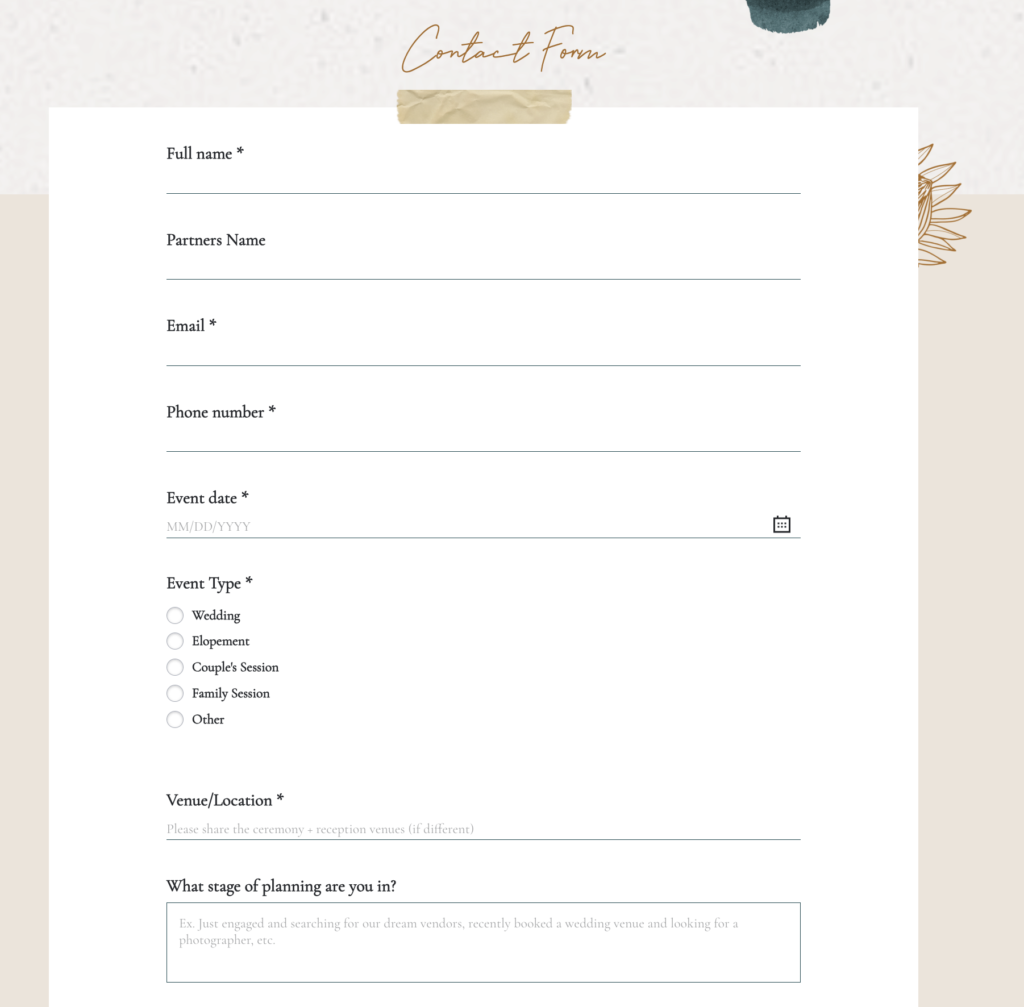
Contact and Lead Forms
My website inquiry form is built through HoneyBook. When someone submits it, their details enter my workspace automatically rather than sitting in a disconnected inbox.
That gives me an immediate project record and a place to manage everything that happens next.
For a photographer receiving a handful of inquiries per year, this may feel like a small convenience. When you receive hundreds of leads, it becomes much more valuable.
Custom Project Pipelines
I have extensively customized my HoneyBook pipeline around the way our photography business operates. The pipeline is broken up into two main areas – opportunities and projects.
The opportunity side includes stages such as:
- Inquiry
- Follow-ups
- Warm follow-ups
- Consultation scheduled
- Proposal sent
- Proposal signed
- Retainer paid
The active-client side includes stages for session planning, wedding planning, timeline creation, editing, album design, and completion.
This lets me open HoneyBook and quickly see where projects are accumulating or which leads still require attention.
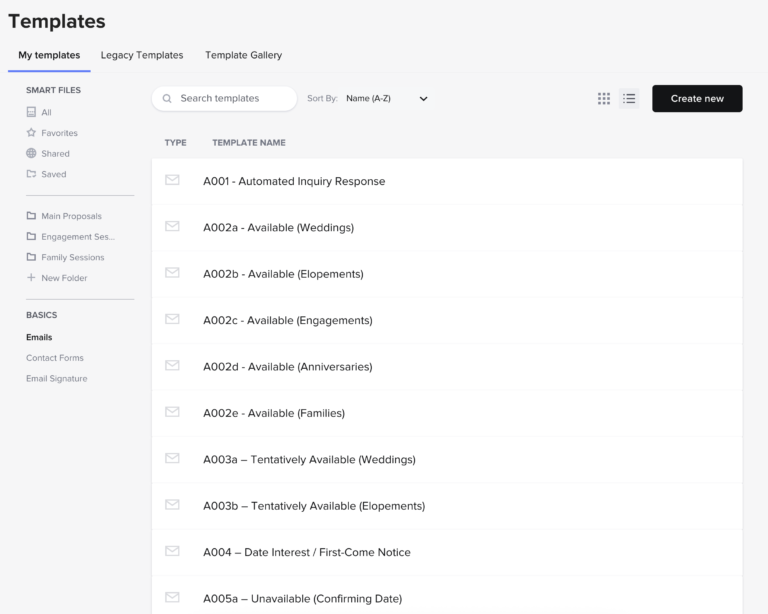
Email Templates
Email templates are among the most frequently used features in my account.
I have templates for inquiry responses, common questions, consultation confirmations, questionnaires, planning messages, sneak peeks, gallery delivery, and many other recurring situations.
The goal is not to send cold or impersonal emails. A strong template gives me a reliable starting point, which I can then personalize where needed.
Once these emails are written and configured, they eliminate a substantial amount of repetitive work.
It’s important to note that your Honeybook account doesn’t really come with pre-made email templates, you will need to create these yourself (or you could always buy some like we have here in our Inquiry to Booking System for Photographers and Client Experience Nurturing System for Photographers).
Smart Files
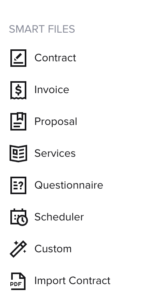
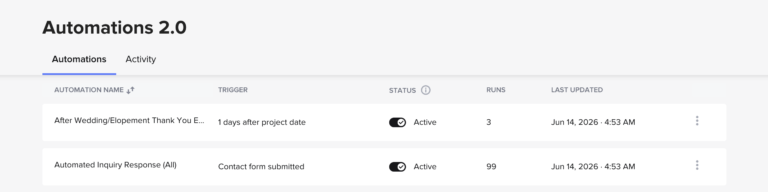
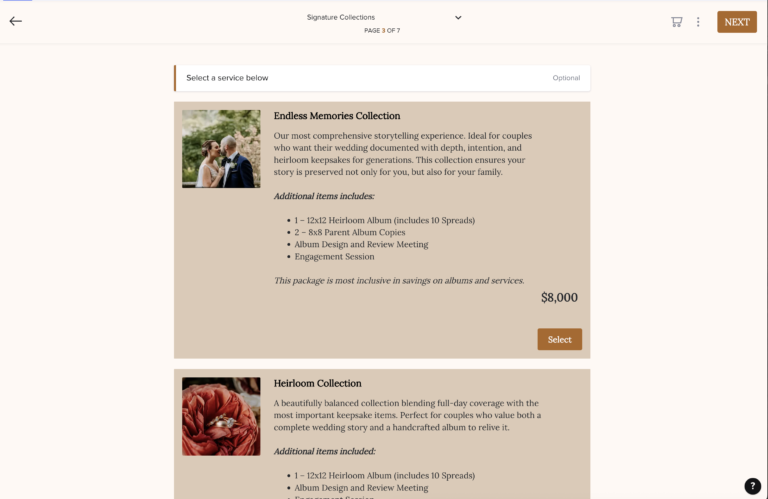
I use HoneyBook Smart Files to build client-facing materials such as pricing guides, questionnaires, proposals, contracts, and invoices…
My photography pricing files include package options, images, information about working together, and a built-in scheduler. A prospective client can learn about our services and take the next step without moving between several unrelated tools.
The flexibility is useful, but Smart Files are also one of the areas that require the most setup. I will return to that limitation later!
Proposals, Contracts, and Invoices
The proposal system is one of the clearest reasons HoneyBook has remained valuable to me over the years.
I can package a client’s selected services, contract, invoice, and payment schedule into one connected booking process. Rather than sending three or four separate documents, the client can complete everything in sequence.
This is actually something that frustrates me to no end when other CRMs for photographers don’t have this type of feature – it basically makes it impossible to recommend.
I maintain proposal templates for weddings, elopements, and portrait services. Once those templates are built, sending a new proposal usually takes only a few minutes.
From a sales perspective, that matters a whole lot. When someone says they are ready to move forward, I do not want to create unnecessary delays or friction.
Online Payments
Early in my photography business, clients sometimes paid through cash or checks sent in the mail (or hand delivered during an in person meet up). In retrospect, I would not recommend building a modern photography business around that process…
Making it easier for clients to pay makes it easier to actually get paid!
Cash only businesses actually risk losing more than 60% of their sales simply by not accepting credit cards. Crazy!!
This is especially relevant when selling higher-priced photography services which weddings, elopements and a lot of portrait services fall into. Clients may want to divide the total across several payments or use a card for at least part of the purchase. HoneyBook allows me to build that payment schedule directly into the booking process so it’s easy!
Scheduling and Calendar Tools
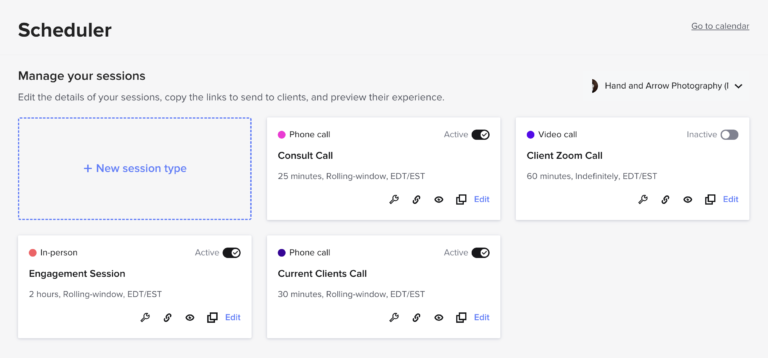
HoneyBook did not have its current scheduling capabilities when I first joined all those years ago, but the scheduler has become one of my most-used tools since it was added back in 2020.
The way I use it is that I maintain different session types for consultation calls and engagement-session scheduling. Appointments populate on my calendar, and clients receive reminders automatically.
I also sync HoneyBook with my Google Calendar. This allows me to see personal, family, and business commitments together, which helps prevent conflicts.
Questionnaires
Questionnaires are particularly valuable in our wedding and portrait workflows.
Around three months before a wedding, I send clients a detailed questionnaire to collect timing information, logistics, photo priorities, family-group combinations, and other details. Their answers remain attached to the project and help me build the wedding timeline.
This is a good example of a feature that improves both organization and the client experience. I get the information I need, and the client sees that we have a structured planning process.
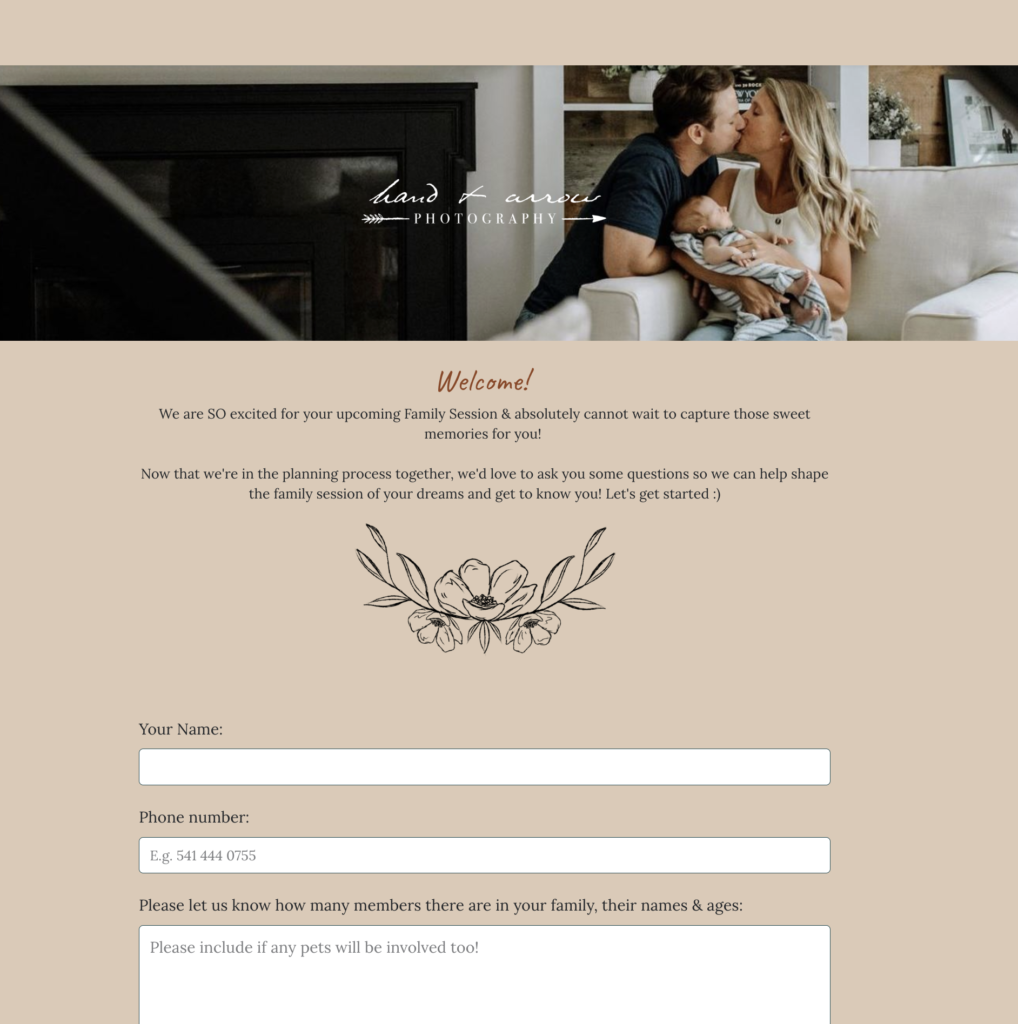
Automations 2.0
HoneyBook’s original automation tools were fairly limited. I primarily used them for internal reminders and basic tasks (if it was used at all). In an older Honeybook review, I actually highlighted to limited use cases for automations to be a big detractor.
Fortunately, Honeybook’s newer automation system, released as Automations 2.0, is much more capable and can support conditional workflows, communication sequences, tags, and project actions.
If that feels like gibberish, I promise it’s easier than it sounds.
Some automation examples I use include:
- Sending an immediate inquiry acknowledgement via an automated inquiry response email < get a free template by following that link!
- Following up with unbooked leads
- Delivering a welcome-week email sequence
- Adding project tags after a contract is signed
- Sending planning communication
- Maintaining contact after a wedding
- Introducing albums, prints, and future sessions
Automation can become as complicated as you allow it to. My objective is not complexity for its own sake. I use it to reduce repeated work, standardize important processes, and lower the chance that a client or lead is forgotten.
5 Things That HoneyBook Does Really Well
1). It Brings the Client Journey Into One Place
This is HoneyBook’s greatest strength in my opinion.
A lead can submit an inquiry, receive communication, schedule a consultation, review services, sign an agreement, and make a payment through one connected system.
For me, that is more useful than having a collection of individually impressive tools that do not communicate with one another.
2). It Makes Following Up Easier
Not every person books after the first response. This is something I teach again and again in a lot of my resources for photographers like my post How to Respond to a Photography Inquiry So More Leads Turn Into Bookings.
I have had clients schedule consultations after my initial email, after several follow-ups, and even after the final message in a sequence that ran for roughly a month.
Without an organized pipeline and automated follow-up, many of those leads would likely have been forgotten. Even a few additional bookings can make a meaningful difference to annual revenue.
3). It Saves Time Once the Setup Is Complete
The initial Honeybook setup requires some effort, but the time savings afterward are substantial.
I can send a proposal within minutes. I can respond to a common question without rewriting the same email. I can send a questionnaire or schedule a consultation without creating a new process every time.
HoneyBook has helped turn tasks that were once inconsistent and pieced together into repeatable parts of the business.
4). It Supports a Better Client Experience
In the photography industry, you’ll find countless conversations about the importance of the “client experience” – but what does that actually mean in practice? For me, it’s about making the process of working together as easy as possible (and also being able to quantify your client experience, which is something I teach heavily in my Client Experience Nurturing System for Photographers).
The reason why Honeybook helps here is that clients benefit from having a clear booking process, online payments, scheduled reminders, organized documents, and a central portal.
Good systems are not only about making the photographer’s life easier. They also reduce confusion for the person hiring you.
5). It Can Replace Several Separate Tools
Depending on your workflow and HoneyBook plan, the platform may reduce or eliminate the need for separate scheduling, form, e-signature, invoicing, and proposal subscriptions (among other things).
That does not automatically make HoneyBook inexpensive, but the value looks different when you compare it with the combined cost and complexity of several disconnected services.
HoneyBook Limitations and Frustrations
All right, now in order to make this Honeybook review a little more balanced and true, I feel a useful review should also address what does not work especially well. Having close to a decade experience working with Honeybook, most of this time has been positive, but there’s also been a few things that I have found frustrating. Let’s talk about those things now…
The Initial Setup Can Be Overwhelming
Here’s the reality check you might need – HoneyBook as a platform gives you tools. But it doesn’t build your business processes for you.
You still need to know things like:
- What emails you want to send
- What your contract should contain
- What services you offer
- How clients will pay
- What questions you need to ask
- When communication should occur
- What stages belong in your pipeline
If you already have those materials, moving them into HoneyBook is manageable (and actually pretty simple once you get a hang of using things like Smart Files). However, when you are building the workflow and learning the software simultaneously, the process can feel much heavier.
A basic contact form and proposal could be configured in a day or two. A more complete system with polished and branded files, email templates, questionnaires, pipelines, and multiple automations may take a couple of weeks or longer to properly set up.
The best approach is to define your process in a separate document first, then build it inside HoneyBook. If you need help creating these systems for yourself, check out the Formed From Light Shop where I have a range of products designed to get you up and running quickly.
While this is a point worth highlighting, this is also something that’s going to apply to virtually any customer relationship manager.
Smart Files Can Feel Dense
Smart Files are flexible and can look excellent when designed carefully. My pricing documents, for example, allow clients to review collections, select services, and schedule a consultation.
The downside is that creating these files can feel almost like building a website. There are layout decisions, images, text, service blocks, and interactive elements to configure. One of the more frustrating aspects of this is I’ve encountered a few glitches and bugs in the times I’ve gone to build these out, which adds to build time and frustration for sure.
I found the older legacy-file system more straightforward. Smart Files can ultimately produce a better result, but the editing experience requires more learning.
Formatting Email Templates Can Be Annoying
Copying formatted text from a Word document or another editor into HoneyBook does not always preserve spacing, bold text, italics, and other formatting exactly as expected.
This is a relatively minor complaint once the templates are finished. During a large setup or migration, though, manually correcting many emails can become tedious. Like potentially taking days of work for a large email template library.
It Is Not Bookkeeping Software
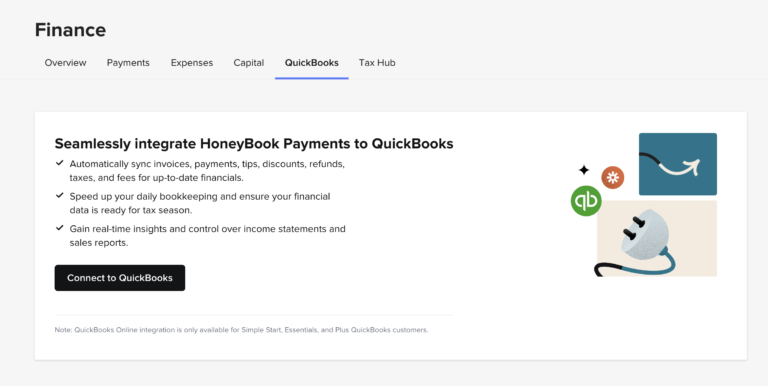
HoneyBook offers many useful financial reporting features (like the literal Reports section), but their Quickbooks integration in particular doesn’t really do much of value. Honeybook is really not something to treat as a replacement for actual bookkeeping (which you can do with a more specialized software like Quickbooks or Wave).
Personally, I use the financial section to see quick information such as revenue, upcoming payments, processing payments, and overdue balances. My formal bookkeeping still occurs elsewhere.
I have personally found the QuickBooks integration more frustrating than useful because it created duplicate information in my setup when I tried using it. This created extra work for me (having to go into my actual bookkeeping software to clean up duplicate entries). That may not reflect every user’s experience, but it is why I currently prefer allowing QuickBooks to pull transactions from my bank accounts instead and leaving this integration turned off in Honeybook.
Team Management May Be Too Limited for Larger Companies
HoneyBook works particularly well for our husband-and-wife business, and I’d argue any partnership or solo photography studio (which is the vast majority of photographers). I have found it less flexible when trying to involve associate photographers, contractors, or external planners.
For example, I have not always had the level of control I wanted over which financial or contractual details a collaborator could view. This has been a huge oversight in the design of the team functionality given so many photographers who hire out are bringing in contracted workers vs. full on employees in their studio.
A solo photographer or two-person studio is unlikely to encounter this as often. A larger company with many users, contractors, roles, and permission requirements should test the team functionality carefully in the free trial before committing to make sure they like how it functions.
HoneyBook Pros and Cons for Photographers
Here’s a simple list of pros and cons I put together for this Honeybook review to help you evaluate whether it’s a good fit for you.
| Pros | Cons |
| Brings leads, clients, projects, and payments together | Initial setup can take considerable time |
| Strong fit for photography-service workflows | Smart Files can feel dense to build |
| Combines services, contracts, invoices, and payments | Email formatting can require manual cleanup |
| Customizable pipelines help organize leads and projects | Not a replacement for full bookkeeping software |
| Email templates save time | QuickBooks integration has been frustrating in my experience |
| Automations support follow-up and client communication | Team permissions may be limiting for larger studios |
| Built-in scheduling can replace another subscription | Full value may require a higher-tier plan |
| Questionnaires and portals improve organization | Unnecessary for someone without regular clients |
| Works particularly well for solo photographers and small teams | Complex workflows still need to be planned outside the platform |
Who HoneyBook Is Best For
I would most readily recommend HoneyBook to the following photographers:
Solo Photographers
HoneyBook is particularly effective when one person handles inquiries, sales, communication, planning, and administration. It gives a solo operator structure without requiring a large internal team. Honeybook seems like it was built with this type of use case in mind, to be honest.
Husband-and-Wife or Small Partnership Studios
Our business is run by my wife and me, and HoneyBook works well for that structure for sure.
I’d also say that small teams with straightforward roles (like other partnerships) should be able to use most of the platform without encountering the permission problems that can become more noticeable in larger companies.
Wedding, Elopement, and Portrait Photographers
Honeybook really targets photographers and creative businesses in general in their marketing, and these businesses tend to follow defined service workflows involving inquiries, consultations, agreements, payments, planning, and delivery. Photographers who are service providers like wedding, elopement and portrait photographers end up being a natural fit for HoneyBook.
Established Studios With Existing Processes
An established photographer who already has contracts, emails, questionnaires, services, and workflows may find it relatively easy to transfer those systems into HoneyBook. The platform becomes the infrastructure for processes that already exist.
Lower-Volume, Higher-Service Businesses
Our studio fits reasonably well into this category…
HoneyBook makes it easy to maintain detailed client records, send thoughtful communication, collect planning information, and create a polished experience across a smaller number of higher-value projects.
Who May Not Need HoneyBook
While I would recommend Honeybook to just about anyone, there are a few categories of people I’d say it’s not necessary for (or could end up detrimental to your operations). These are:
Photographers Without Paying Clients Yet
So, if you are a complete photography business beginner, you do not necessarily need to begin paying for a CRM before you have leads or customers. It’s certainly not going to hurt, but I’m looking at this more through the lens of keeping costs lean early on (especially when you’re not really generating an income).
Instead of Honeybook, you could use a spreadsheet, calendar, and a few documents may be enough while you establish your first portfolio and begin attracting work.
Once you are regularly sending agreements, collecting payments, and managing overlapping projects, HoneyBook becomes much easier to justify.
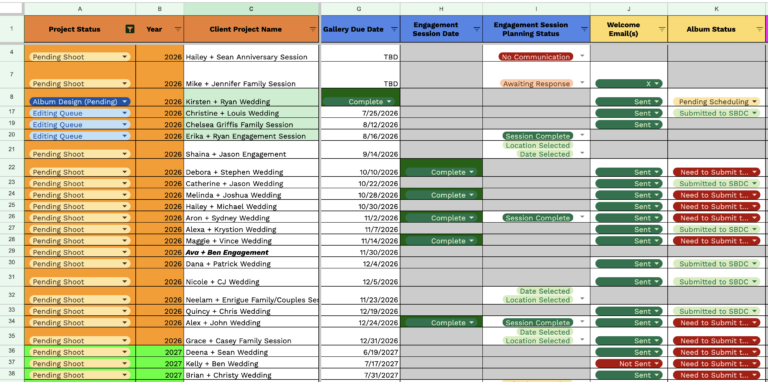
It’s also worth mentioning here – while I use Honeybook constantly, I also maintain spreadsheets (and other things) that allow me to have secondary points of reference for my client project data. This is something I highly recommend for newcomers and experienced photographers alike even if it means having a backup.
Large Photography Companies
A large studio with employees, numerous associates, departments, or complicated permission requirements may need more robust team-management capabilities. I mentioned it earlier in this article, but in my use of the “teams” functionality in Honeybook, I never felt like I could fully trust it. I think that for a smaller team (or say a solo photographer who has occasional collaborators), you can live with some of the downsides here, but big teams should be mindful.
The reality is that HoneyBook can support teams, but I would not assume it will meet every operational need without testing it.
Product-First Businesses
HoneyBook is intended primarily for project-based service relationships.
A photographer who occasionally sells albums or prints can handle those purchases within a client project (and even sell some of these products using a Smart File brochure, as an example). But, a company primarily selling products at scale will be better served by an ecommerce platform, not Honeybook (or any CRM for that matter).
Anyone Looking for a Complete Bookkeeping Platform
HoneyBook provides reports and payment information, but it should not be viewed as a substitute for accounting software or professional financial guidance.
HoneyBook Pricing and Value for Photographers
I currently use HoneyBook’s Premium plan because I use a wide range of its features, including more advanced automations.
That does not mean every photographer needs the highest plan. A newer photographer may find that the Starter plan provides enough functionality to organize clients, send agreements, and collect payments. The right tier depends on the features you will genuinely use.
HoneyBook has increased its prices during the years I have been a member (which is going to make sense for any SaaS platform). I naturally prefer keeping business expenses low, but I evaluate this subscription in a practical way:
Has HoneyBook helped me save enough time, secure enough bookings, and manage enough revenue to pay for itself?
For my business, the answer is easily yes.
I have collected hundreds of thousands of dollars in client payments through HoneyBook while managing hundreds of clients and many more leads. Against that scale of use, the subscription is a relatively small operating expense.
Current plans, prices, and processing fees can change, so I maintain a separate guide for those details – check my Honeybook Pricing Guide for more.
HoneyBook Alternatives
Back in the day, I originally tested several platforms that were popular with photographers at the time (and some still are) including 17hats, Dubsado, and Táve (which is now VSCO Workflows). I chose HoneyBook largely because I found it easier to understand and work with at the time.
That decision was based on my needs and preferences. Other photographers may reasonably choose a different platform. While Honeybook is my top CRM recommendation for photographers, I always would advise you to do your own research, pick up a trial with the CRMs that look most interesting to you, and evaluate them each based on your own needs.
Dubsado
Dubsado may appeal to businesses seeking extensive customization and more control over certain workflows. That flexibility can also create a steeper setup and learning process.
Táve (now VSCO Workflows)
Táve has historically been oriented heavily toward photography studios and may be worth considering for photographers who want detailed studio-management capabilities. When I tested CRMs early on, it was one of the few I genuinely didn’t like due to the set up complexity (but of course that’s one mans opinions, I know others who swear by them).
17hats
17hats combines several small-business tools and may work for users who prefer its interface or feature structure.
Studio Ninja and Other Photography CRMs
Photography-specific CRM alternatives like Studio Ninja may offer simpler setups or features designed around common studio workflows.
I do not recommend choosing from a comparison table alone. Use free trials to recreate one meaningful part of your process:
- Create a lead form.
- Build a proposal.
- Add a contract and payment schedule.
- Send yourself a test project.
- Review the client-facing experience.
- Consider how easily you could use it every day.
HoneyBook won my original comparison because it felt the most workable to me. Nearly a decade later, I have not found a compelling enough reason to rebuild my entire business somewhere else (and I’ve even continued to check out other CRMs over the years, too).
If you’re wanting a more in depth breakdown, check out my article about Top CRMS for Photographers by clicking the button below!
Is HoneyBook Worth It for Photographers?
Okay, so I’m getting to the end here and now I want to break down the big question you may be asking yourself.
HoneyBook is worth it for photographers who are booking clients regularly and need a more organized way to manage inquiries, communication, agreements, payments, and project workflows.
It has made my business easier to run. More importantly, it has helped me create processes I can repeat without relying on memory or scattered tools. Put plainly, it’s helped me grow and scale.
The platform will not write your emails, define your services, create your contract terms, or decide what your client experience should look like. You need to bring those decisions to the system.
Once that foundation exists, HoneyBook can make executing it far easier.
My recommendation of Honeybook is strongest for:
- Solo photographers
- Wedding, elopement and portrait photographers
- Small partnership studios (like mine)
- Independent service businesses in general
- Photographers receiving enough leads that follow-up is becoming difficult
- Businesses ready to move away from paper contracts, manual invoices, and disconnected tools
I would be more cautious if you have no paying clients, need sophisticated staff permissions, operate a large team, or primarily sell products.
Try HoneyBook
HoneyBook offers a free trial, which is the best way to decide whether the workflow feels natural to you.
Do not try to configure everything during the first hour. Start with the two things that originally mattered most to me:
- Create a contact form.
- Build a proposal containing your services, contract, and invoice.
Then send the process to yourself as though you were the client.
That will tell you much more than scrolling through a list of features.
If you’re interested in trying Honeybook for yourself, when you start through my referral link, HoneyBook currently offers 30% off the first year of an annual membership or 30% off the first two months of a monthly membership.

Start Your Honeybook Free Trial
Affiliate disclosure: I am a HoneyBook educator and referral partner. I may receive compensation when someone becomes a paid member through my link, at no additional cost to them. This review reflects my genuine experience using HoneyBook within my photography business for approximately nine years at time of writing.
Honeybook Frequently Asked Questions
Is HoneyBook a CRM for photographers?
HoneyBook is a client relationship and business-management platform used by photographers and other independent service providers. It is not exclusive to photography, but its lead, contract, invoice, payment, questionnaire, scheduling, and workflow tools fit photography businesses well.
Is HoneyBook good for wedding photographers?
Yes. Wedding photographers tend to manage long client relationships involving inquiries, consultations, contracts, payment schedules, questionnaires, planning, and follow-up. HoneyBook can support nearly every administrative stage of that process.
Can HoneyBook send contracts and invoices?
Yes. Photographers can use HoneyBook to send contracts, invoices, and service selections as part of a connected client file or proposal.
Can clients pay through HoneyBook?
Yes. HoneyBook supports online client payments and payment schedules. Available methods and processing fees should be confirmed through HoneyBook’s current pricing and payment documentation.
Does HoneyBook replace QuickBooks?
No. HoneyBook offers payment reporting and a QuickBooks Online integration, but I still use dedicated bookkeeping software for formal financial management.
How long does HoneyBook take to set up?
A simple contact form and proposal can be created in a day or two. A more complete system with pricing files, emails, questionnaires, pipelines, and automations may take around two weeks or longer, especially when the underlying business processes have not yet been defined.
Is HoneyBook difficult to use?
I originally chose HoneyBook because I found it easier to work with than several alternatives. Individual tools are generally manageable, but building a complete workflow can feel overwhelming. Much of that difficulty comes from deciding what your business process should be rather than operating the software itself.
Is HoneyBook good for photography teams?
It can work for small teams and partnerships. Larger studios should test user roles, permissions, collaboration, and financial visibility carefully because those controls have felt limiting in my experience.
Which HoneyBook plan is best for photographers?
That depends on the features you need. A newer business may be able to begin with Starter, while photographers wanting more advanced workflows and automations may need Essentials or Premium.
Final Thoughts
Before HoneyBook, my photography business was much more pieced together. Contracts, payments, messages, project details, and planning information lived in different places, and staying organized became harder as the business grew.
HoneyBook did not instantly solve that. It took time to define my workflows and build the system.
But once that work was done, it became one of the foundations of the business.
That is ultimately what matters most in this HoneyBook review for photographers. The platform has not remained part of my workflow for nearly a decade because of one impressive feature or a temporary promotion. It has remained because I use it every day, it saves me time, and it makes managing both leads and clients significantly easier.