How to Respond to a Photography Inquiry So More Leads Turn Into Bookings
Learning how to respond to a photography inquiry is one of the most important parts of running a photography business.
Not because one email magically books every client. It won’t…
But because the first response is often the first real moment where someone experiences what it might feel like to work with you. Your portfolio may have gotten their attention. Your website may have created enough trust for them to reach out. But your inquiry response is where the actual sales process starts.
After running a photography business for more than a decade, one of the clearest things I’ve learned is that creative skill alone is not enough. If you want photography to become a real business, you have to learn how to communicate with potential clients in a way that feels clear, timely, helpful, and easy for them to respond to.
This guide will walk you through how to respond to photography inquiries better, what to include in your reply, how automation can help, when to use email, text, or calls, and what to avoid if you want more leads to become booked clients.
The Short Answer: How Should You Respond to a Photography Inquiry?
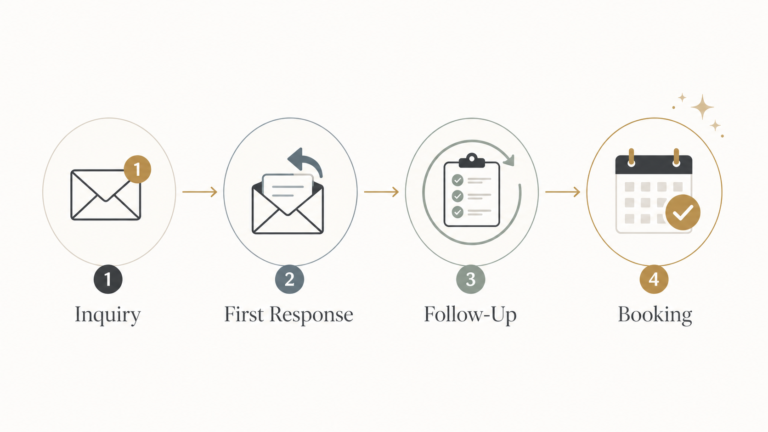
When someone sends a photography inquiry, respond as quickly as possible with a clear, professional message that thanks them, confirms you received their request, sets expectations, answers their key questions, and gives them a specific next step.
A strong photography inquiry response usually includes things like…
- A warm thank you
- Confirmation that you received their inquiry
- A clear response timeframe (if your first response is automated)
- Your availability (if you can confirm it)
- Answers to any questions they asked
- Helpful next-step information
- A link to pricing, a brochure, full galleries, or scheduling details, depending on your process
- One clear call to action at the end
The goal is not to overwhelm them with everything at once. The goal is to make the next step easy!
That may mean scheduling a call. It may mean reviewing your pricing guide. It may mean replying with a few more details. What matters is that they know exactly what to do next.
Start With the Right Assumption
Something significant I learned over the years is that it’s important to approach responding to new photography leads with a healthy mindset. Think:
When someone reaches out, assume they are genuinely interested.
That may sound a little obvious, but it is easy to forget, especially if you are newer and not getting many inquiries yet. Not completely uncommon is this experience…a lead comes in, you respond, then they disappear. After that happens a few times, it is easy to start treating inquiries casually, defensively, or with less urgency.
But most people who inquire are not wasting your time. They are trying to learn more!
They may be comparing multiple photographers (this is normal consumer behavior even if they love your work). They may be checking availability. They may be trying to understand pricing and more about what you offer. They may have reached out in a burst of excitement, then got pulled back into work, family, wedding planning, or life in general…
This is especially true for weddings and portraits. A couple planning a wedding might be emailing photographers, venues, florists, DJs, planners, and caterers all in the same week. Their inbox can get crowded fast.
So if they do not respond immediately, it does not always mean they are not interested. It doesn’t mean they are necessarily “ghosting” you. It may just mean your message got buried. It may mean they are still deciding. It may mean they need a helpful follow-up.
Remember…an inquiry is not a booking yet. But, it is an invitation to guide them.
That distinction matters. When someone fills out your contact form, they are not necessarily committing to hire you on the spot. They are usually saying, “I’m interested enough to learn more.” Your job is to treat that seriously and move them one step further with care, clarity, and direction.
Respond Quickly, Even If You Cannot Respond Personally Yet
Let’s get this out of the way: response speed matters.
In our experience, being one of the first photographers to respond can make a real difference. I can think of many situations where clients told us they had reached out to other photographers and either never heard back or only heard back much later.
That is a very simple way to lose business.
If someone has taken the time to fill out your contact form, that inquiry should become one of your highest priorities. If you are struggling to make sales, responding to leads should take precedence over almost everything else.
That does not mean client experience, editing, branding, or content creation do not matter. They do. But if new inquiries are not being handled well, the rest of the business will feel harder to sustain.
A good standard is:
- Send an immediate automated response (you can get a free template for this we put together here)
- Send a personalized response within 24 hours (or as soon as possible)
- Follow up (multiple times even) if they do not reply
Because this is a process that looks to systematize responding to inquiries, this is where automation can also become really helpful especially as you grow. It allows you to acknowledge the inquiry right away, even if you are not in a position to personally respond at that exact moment.
Think of it this way…Maybe you are photographing a wedding. Maybe you are spending time with family. Maybe it is outside your business hours. Maybe you need to check your calendar before you can give a real answer. Being able to get a message back to someone quickly is key!
That is normal. The point is not to be available every second of the day. The point is to have a system that makes sure the lead is cared for quickly.
Use a Two-Part Inquiry Response Process
The best inquiry response process I’ve found is not fully manual or fully automated.
It is usually a combination of both.
For my own business, this has evolved quite a bit over the years. When I first started, I did not have a particularly clear process. I would get an inquiry, respond manually, try to remember what to send, and piece things together as I went. It worked sometimes, but it was not very consistent.
Now, because my business is more established and receives a higher volume of leads, I use a more structured process. Part of the goal is to respond quickly and serve people well. Part of the goal is also to help filter for more serious inquiries so I am spending the most time with people who are genuinely interested and aligned with the service.
That does not mean every photographer needs the exact same setup. A newer photographer may want a more hands-on, personal process with every lead. A busier photographer may need more structure, automation, and filtering. The right process depends on where your business is, what kind of work you want, and how much lead volume you are handling.
But in most cases, a two-part response works well. Let’s break that down now!
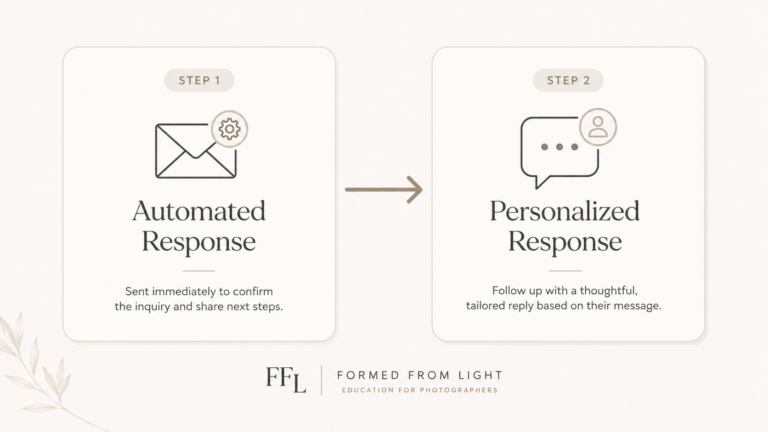
Part 1: The Automated Inquiry Response
This is the message that goes out immediately after someone submits your contact form.
I have this set up through HoneyBook (my CRM). My contact form is built in HoneyBook and embedded on my website. When someone submits it, I receive a lead notification by email, the information is added into HoneyBook, and a new project is created for me automatically.
At the same time, the lead receives an automated email response.
That automated email does a few important things:
- Confirms the inquiry was received
- Thanks them for reaching out
- Sets expectations for when they will hear from me personally
- Gives them something helpful to do while they wait
- Creates an immediate first touchpoint
For example, your automated response might say something like:
“Thank you so much for reaching out. I’m excited to learn more about what you’re planning. I personally review every inquiry and will follow up within 24 hours. In the meantime, here are a few helpful resources you can look through.“
That is simple, but it does a lot!
It acknowledges them. It sets expectations. It gives them confidence that their inquiry went through. It creates another opportunity for them to engage with your brand.
In my own process, I like giving people something to do while they wait. That could be a helpful guide, a blog post, a link to full galleries, a planning resource, or another piece of content that helps them better understand your work. The exact resource can vary depending on your business, but the idea is the same: keep them engaged instead of letting the inquiry sit cold.
Get a Free Automated Inquiry Response Email Template
Part 2: The Personalized Response
The second part is your actual personal reply.
This is where you review the inquiry and respond based on their details.
At this point, you may need to consider things like:
- Are you available for their date?
- Is this a service you offer?
- Is this a project you actually want to pursue?
- Did they ask any specific questions?
- Do they need pricing information?
- Should you invite them to schedule a call?
- Should you send a proposal, brochure, or next-step guide?
In my own business, once I review the lead, I use different email templates depending on the situation.
If I am unavailable, I have a template for that.
If I am available and interested in the project, I use a more personalized availability response. That message allows me to reference details from their inquiry, confirm availability, and send them my pricing brochure, which is also currently built in HoneyBook.
That brochure walks them through more about the service, shares packages, provides pricing information, and gives them clear directions for the next step, which is usually booking a call.
This response should feel more personal because it is more personal.
If you are available, confirm that. If they asked questions, answer them. If your process includes sending pricing up front, include your pricing guide or brochure. If your process is more consult-driven, make the call scheduling step very clear.
A simple structure could look like:
- Thank them personally
- Mention a specific detail from their inquiry
- Confirm availability or interest
- Answer any initial questions
- Share the next helpful resource
- Give them one clear next step
The automated response handles speed. The personalized response handles trust.
You need both!
If you want the full inquiry-to-booking process already mapped out, the Inquiry to Booking System includes the response emails, follow-ups, consult scheduling messages, and booking nudges so you are not building it from scratch.
Email Should Be Your Main Response, But Not Your Only One
Email is usually the natural first place to respond to photography inquiries.
It works well because you can include more information:
- Pricing guides
- Scheduling links
- Full galleries
- Blog posts
- Planning resources
- Brochures
- Service details
- Answers to specific questions
Email gives you space to communicate thoughtfully. It is where you can explain things clearly and provide links that help the person move through your process.
But email should not always be your only touchpoint…
Email deliverability is imperfect. Sometimes messages land in the notorious junk folder (“spam”). Sometimes they get buried. Sometimes people simply do not open every email they receive, even when they are interested.
A small practical note here: when possible, I prefer using links instead of heavy attachments. A link to a pricing guide, brochure, gallery, or hidden webpage is usually cleaner than attaching a large PDF. It can also make the email feel easier to navigate and may reduce some deliverability concerns, depending on your email setup.
That is why I like pairing email with a simple text message – More on that in a sec!
Don’t Ignore the Subject Line
Another factor that’s important with responding to inquiries as a photographer is your subject line. Now, your subject line is easy to overlook, but it can matter (and sometimes even more than the actual content in your email).
Let’s think of it like this…
If someone has reached out to several photographers, their inbox may be full of similar-looking replies. A more specific subject line can help your email feel more personal and easier to find later.
Instead of leaving the subject as something like “New Inquiry Form Submission,” consider using a subject line that references the actual inquiry in some way to bring more attention.
Examples:
- Your [Venue] Wedding Photography Inquiry
- [Date] Wedding Photography Availability
- Your Portrait Session Inquiry
- [Name], I’d love to talk more about your wedding
- Details for your [Location] session inquiry
In my own inquiry response emails, I also like using a small emoji in the subject line to help the message stand out visually in the inbox. I would not overdo this or make it feel gimmicky, but a subtle visual marker can help your email feel a little warmer and more noticeable.
The goal is not to trick someone into opening your email. The goal is to make your response easy to recognize, especially when they may be sorting through a lot of vendor communication at once.
How to Use Text Messages After a Photography Inquiry
A text message does not need to contain everything.
In fact, it probably should not.
The purpose of the text is usually to reinforce the email and make sure they know you responded.
Here’s a simple text message example:
Hi [Name], this is Chris from Formed From Light. Thanks so much for reaching out. I just sent over an email with more details and next steps, so keep an eye out for that when you have a chance.
That is enough!
It feels personal, it is easy to read, and it points them back to the email where the more detailed information lives. Text is naturally a bit more casual.
This is helpful because people tend to notice texts quickly. They are right there on the phone. For busy clients, especially couples planning a wedding or professionals juggling a packed schedule, that extra touchpoint can keep your response from being missed.
What About Social Media DM Inquiries?
The same principles apply if someone reaches out through Instagram, Facebook, or another social media platform.
Respond quickly. Acknowledge what they asked. Be helpful. Give a clear next step.
But when possible, I would try to move the inquiry into your main workflow. That might mean sending them to your contact form, asking for their email, or creating a project in your CRM manually.
DMs are easy to lose track of. They are also harder to automate, organize, and follow up on consistently. If a lead is serious, it is usually worth getting them into the same process as everyone else so they do not slip through the cracks.
Should You Call Photography Leads?
Sometimes, yes…
But I would not make cold calling every inquiry your only strategy.
A phone call can work well depending on your market, your personality, your clientele, and the type of service. Some clients may appreciate it. Others, especially younger clients, may not love getting an unexpected call.
For my own process, I tend to focus more on email and text because they are easier to systemize. I can template them, automate parts of them, and use them consistently. Phone calls are more dependent on timing.
That said, if someone requests a call, schedules a consultation, or clearly prefers talking things through, calls can be very effective.
The main point in all this is this:
Do not rely on one communication method if your goal is to actually reach the person.
How to Respond to a Photography Inquiry Step by Step
Your inquiry response should be simple, but it should not be empty.
A weak response says something like:
Thanks for reaching out. I’m available. Let me know if you want to book…
That technically responds, but it does not guide the person. And it definitely doesn’t get them excited!
A better response gives them enough information to keep moving. So let’s break down what that can look like in practice…here’s the qualities that make a great email response!
1. Thank Them for Reaching Out
This sounds basic, but it matters.
They chose to contact you. Acknowledge that. Keep it warm and natural.
Example:
Thank you so much for reaching out. I’m really glad you found my work and took the time to share more about what you’re planning.
2. Confirm Availability or Next Review Step
If you can confirm availability, say so.
Example:
I checked my calendar, and I’m currently available for your date.
If you need more time, set that expectation.
Example:
I’m going to take a closer look at the details you sent over and will follow up with a more complete response by tomorrow.
This is useful because it reassures the person that you are actually handling their inquiry.
3. Personalize the Message
Reference something specific from their inquiry.
This could be things like:
- Their wedding date
- Their venue
- Their location
- Their session type
- Their story
- Their timeline
- A specific question they asked
You do not need to overdo it. One or two details can be enough.
Example:
Your plan for a smaller fall wedding in the Lehigh Valley sounds really beautiful, and I’d be happy to talk more about what coverage could look like.
Specificity makes the message feel less templated, even if you are using a template as your starting point.
4. Answer Their Questions
If they ask a direct question, answer it.
This seems obvious, but photographers sometimes skip this because they are trying to push the lead toward a call or brochure.
You can still guide them to the next step, but answer what they asked when possible.
If the answer depends, say that!
Example:
Coverage depends a little on the flow of the day, but most couples in a similar situation tend to need around 8 hours.
This builds trust.
5. Share the Next Useful Resource
So, this is going to depend on your process.
You might send:
- Pricing guide
- Brochure
- Full galleries
- Blog post
- Session guide
- Scheduling link
- FAQ page
- Planning resource
For us, a pricing brochure is often part of the process because it gives people a clearer understanding of what we offer and what working together looks like.
Other photographers may prefer to hold pricing until a consultation. That is fine too. The point is not that every photographer needs the same exact process. The point is that your response should move the lead somewhere intentional.
Should You Send Pricing Right Away?
This depends on your business model, how established your brand is, and what kind of leads you are receiving. It also depends on how you like approaching sales consults.
Yeah, I wish there was always a one-size fits all solution too!
Some things I keep in mind when someone asks me this question…
When you are newer – you may benefit from more conversation before sending full pricing. You might need to build trust, explain your process, and help people understand the value of what you offer before they start comparing numbers.
When your business is more established or you are getting a higher volume of inquiries – sending pricing earlier can be useful. It can help filter for people who are more serious, more aligned, and more prepared to invest.
In my own business, I currently send a pricing brochure after reviewing the lead and confirming availability or interest. I’ve experimented with different approaches over the year and most significantly have landed on this being my preference because it feels “right” for me (and I’m getting the bookings I need doing it). That works well for where my business is now, but it is not the only valid approach. It’s worth mentioning, I’ve had positive experience doing it other ways myself and also know plenty of photographers who do it differently who also do just fine.
The bigger point is this: if you send pricing, do not send pricing alone.
Pair it with value. Include context. Show full galleries. Explain what the service includes. Give them a clear next step. Pricing should be part of the conversation, not the entire conversation.
6. Give One Clear Call to Action
This is where many inquiry responses fall apart.
If you do not give people a clear next step, many people will not take one.
Your CTA might be:
- Schedule a call
- Reply with more details
- Review the pricing guide
- Choose a package
- Fill out a questionnaire
- Confirm they want a proposal
Example:
If this feels like a good fit, the next step would be to schedule a quick call so we can talk through your plans and see what coverage makes the most sense.
Then include the scheduling link or explain exactly how to schedule.
It’s simple in practice! 🙂
Example Photography Inquiry Response Email
Here is a simple example of what a personalized inquiry response could look like.
This is not the only way to write it, but it gives you a structure you can adapt based on your own process.
Hi [Name],
Thank you so much for reaching out. I loved reading a little more about what you’re planning, and I’m so glad you found my work.
I checked my calendar, and I’m currently available for [date/session timeframe]. Based on what you shared, I think this could be a really good fit, and I’d be happy to talk more about what coverage could look like.
I’ve included my pricing guide here so you can get a better sense of the collections, what’s included, and how the process works. You’ll also find a few full gallery examples so you can see what a complete delivered experience looks like beyond the images shared on my website or Instagram.
The next step would be to schedule a quick call so I can learn more about what you’re planning and answer any questions. You can choose a time here: [scheduling link]
Looking forward to talking more,
[Your Name]
The structure matters more than the exact words (and in fact the words should be changed to be more aligned with how you speak, your tone, your brand, etc.).
You are acknowledging them, confirming the relevant details, giving them helpful information, and making the next step clear.
How to Respond to Wedding Photography Inquiries
The response process will be similar regardless of your niche, but the importance of the response is even higher for higher-value services.
Wedding photography is a good example because the decision usually carries more weight. Couples are often spending a significant amount of money, comparing multiple photographers, thinking through venues and timelines, and trying to make a decision that feels both practical and emotional.
When responding to wedding photography inquiries (in particular), I would usually make sure to:
- Confirm whether you are available for their date
- Mention their venue or location if they provided it
- Acknowledge something specific about what they shared
- Send pricing or invite them to schedule a consult, depending on your process
- Link to full wedding galleries when possible
- Give a clear next step, usually scheduling a call
For example, if a couple reaches out about a wedding at a venue you know well, mention that. If they are planning a smaller elopement, acknowledge that the coverage may look different than a full wedding day. If they are still early in the planning process, let them know you can help them think through what coverage might make sense.
Also remember that couples may be contacting several photographers around the same time. They may not remember every detail from every website they looked at. A clear, personal, helpful response makes it easier for them to understand why you may be the right fit.
How to Adjust Your Response for Different Inquiry Types
So here’s the thing…not every inquiry should receive the exact same response.
Templates are helpful, but they work best when they can flex based on the type of lead.
Wedding Inquiry
For a wedding inquiry, prioritize the date, venue, coverage needs, pricing or consultation, and full gallery examples. These leads usually need more trust-building and often benefit from a call.
Portrait Inquiry
For a portrait inquiry (this will apply to families, engagements, boudoir, headshots, etc.), you may focus more on session type, location, availability, pricing, what the session experience looks like, and how they will receive their final images.
Unavailable Date
If you are not available, still respond professionally. You can thank them, let them know you are unavailable, and, if appropriate, refer them to another photographer you trust.
This is a small thing, but it still contributes to your reputation. Someone who is not the right lead today might refer to someone else later, or they may come back for another session in the future.
Pricing-Only Inquiry
If someone only asks for pricing, do not assume they are a bad lead. They may simply be trying to understand whether your service is realistic for them. Almost ironically, some of my favorite bookings started out with clients who submitted pretty basic seeming inquiries with me.
You can answer clearly while still guiding them toward your full process.
For example, you might say:
Thanks so much for reaching out. I’d be happy to send more information. My collections begin at [starting price/range], and I can send over the full guide once I know a little more about what you’re looking for.
That gives them useful information without turning the entire conversation into a price quote.
Vague Inquiry With Few Details
Some inquiries come in with very little information. Often I see these as a little lame, to be honest, but I also know from experience (man, I’m full of them) that sometimes these simple inquiries turn out to be amazing people on the other end of working together.
With that said, in that case, your next step may be to ask a few clarifying questions rather than sending everything at once.
For example:
I’d be happy to send more information. Before I do, could you share your ideal date, location, and the type of session or coverage you’re looking for?
The goal is not to create a separate process for every possible scenario. The goal is to have a flexible system that helps you respond thoughtfully without starting from scratch each time.
Your Inquiry Response Starts With Your Contact Form
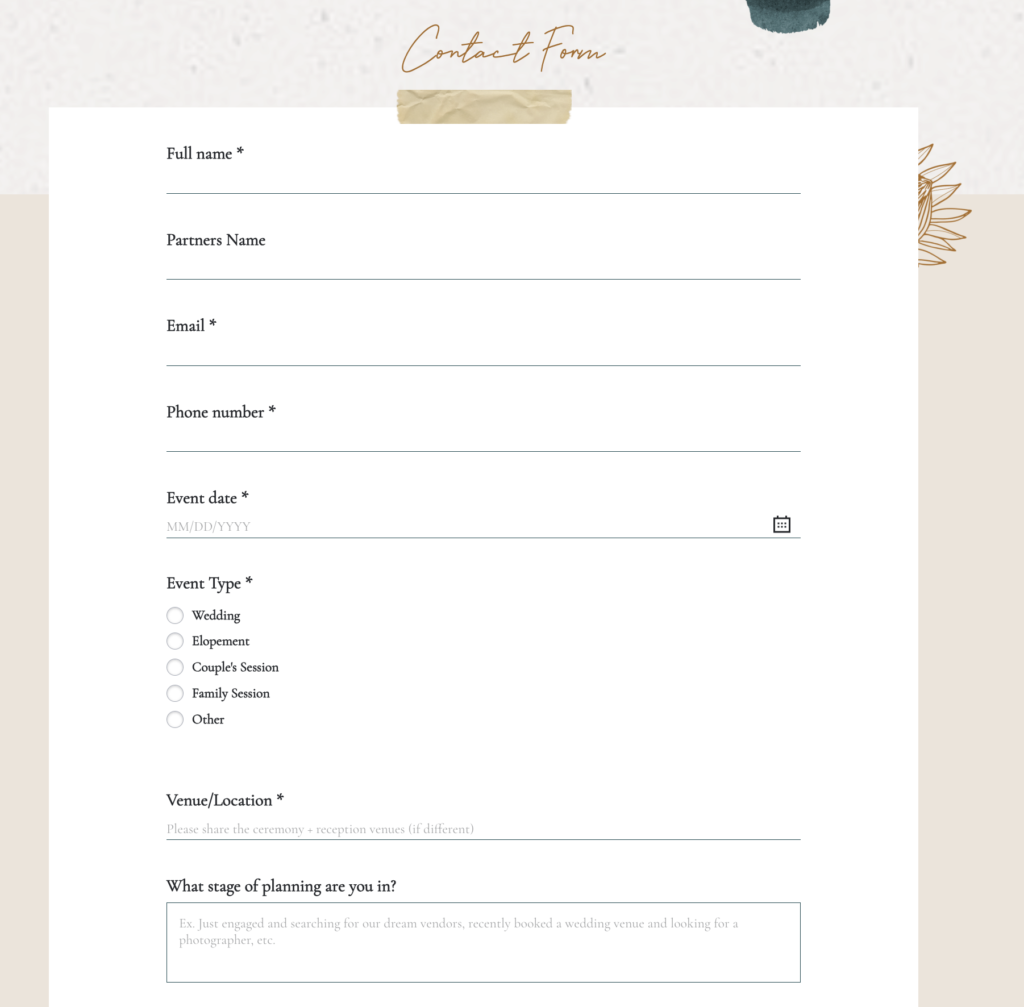
A strong inquiry response is much easier to write when your contact form collects the right information.
If your form only asks for a name, email, and date, you can still respond, but you may not have much to work with. That makes your reply more likely to sound generic because the lead has not given you many details to respond to.
A better contact form gives you enough information to personalize your response, qualify the lead, and guide them to the right next step.
Keep in mind, this doesn’t mean you need to make the form painfully long or anything. If it feels like homework, some people will not fill it out. But you do want enough context to understand what they are looking for.
Useful photography inquiry form questions might include things like:
- What type of session or event are you planning?
- What date or timeframe are you considering?
- Where will this take place?
- What drew you to my work?
- What matters most to you about photography?
- Are there any questions you already have?
- How did you find me?
For weddings, you might also ask:
- What is your venue?
- Are you working with a planner?
- About how many guests are you expecting?
- What part of the day matters most to you?
- What kind of coverage are you hoping for?
These answers make your response better!
If someone says they were drawn to your candid reception photos, you can speak to that. If they mention they are nervous in front of the camera, you can reassure them. If they share their venue, you can mention whether you have worked there or what kind of coverage may fit.
This is another reason I like using a CRM form. The information does not just land in an inbox. It becomes part of the lead record, which makes it easier to review, respond, and follow up.
Use a CRM to Capture and Organize Leads
If you are still managing inquiries only through a basic website form and your inbox, it can work for a while. But as your business grows, it gets harder to keep things organized.
A customer relationship manager (CRM) is a software that can help you:
- Capture inquiries through an embedded form
- Automatically create a lead or project
- Trigger an automated response
- Use email templates
- Track where each lead is in the process
- Send proposals, contracts, and invoices
- Keep communication in one place
There are many CRMs for Photographers and businesses out there. I personally use HoneyBook for this in my own business (and have for most of my 10+ years in business). When someone fills out my contact form, the inquiry comes into my email and into HoneyBook, which makes it easier to trigger automations and keep track of where things stand.
This is especially helpful when you are getting inquiries while you are busy photographing, editing, traveling, parenting, or just living your life.
The goal of a CRM is not to make your business feel robotic. It is to make sure important leads do not get missed.
Why Follow-Ups Matter
While the goal of this post is to talk about responding to inquiries, part of this conversation naturally ends up talking about what happens when people don’t respond. A lot of photographers (myself at times, too) get discouraged when leads do not respond.
I get it. It can feel like the infamous feeling of “ghosting.”
And let’s be honest…sometimes it is. Sometimes someone decides to go with another photographer and does not want to send an awkward rejection email. Sometimes they were just price shopping. Sometimes they were never that serious.
But often, the reason is much simpler…
The email got buried. They got busy. They meant to respond. They are comparing options. Wedding planning got overwhelming. Work picked up. Life happened…
That is why follow-ups matter!
For higher-value services like weddings, portraits, and elopements, people usually need multiple touchpoints before making a decision. They are not buying a pack of gum in the checkout line. They are making a more emotional, more expensive, more considered purchase.
Think about the touchpoints you’re having with your potential client just in your inquiry response process…here’s some common ones I’m using myself:
- Your inquiry response is one touchpoint.
- A text message is another.
- A follow-up email is another.
- A consultation is another.
- A pricing guide or full gallery is another.
You are not bothering people by following up respectfully. You are helping them continue a conversation they started.
To give you a recent example of this in action from my own business experience – I had a client receive my full (1 month long) follow up campaign after they reached out to me. I didn’t hear a peep from them when I sent my inquiry response emails or even most of my follow ups, until the last one. After that last one, they scheduled a consult call and ended up booking a fairly last minute, full day wedding photography package. Without the follow ups, I would have lost the opportunity and sale!
Can you think of what a difference a couple extra bookings like this could make for your business?
A simple follow-up cadence could look like this:
- Immediate automated confirmation after the inquiry
- Personalized response within 24 hours
- First follow-up 2–3 days later if they do not reply
- Second follow-up 5–7 days later
- Final soft close if appropriate
This can also be expanded, of course. But, know that it’s not like you have to be aggressive or overly salesy. In fact, you should not be. The best follow-ups feel calm and helpful.
A simple follow-up might say:
Hi [Name], I just wanted to check in and make sure you saw my last email. I’d still be happy to talk through your plans and answer any questions if you’re still looking for a photographer.
A final soft close (last email in a follow up sequence) might sound like:
Hi [Name], I wanted to follow up one more time in case you’re still looking for a photographer. If now is not the right time or you’ve gone in another direction, no worries at all. I’m happy to help if you have any questions.
That kind of message gives them room to respond without pressure.
A full follow-up process can become its own workflow, especially if you are managing multiple leads at once. For this article, the key is simple: do not assume silence means no. Follow up clearly, kindly, and consistently.
How Not to Respond to Photography Inquiries
Knowing what to avoid is just as important as knowing what to include.
In this section, I’m going to highlight a few common mistakes I’ve seen in inquiry email responses by photographers.
Taking Too Long to Reply
This is probably the biggest one.
If someone is actively looking for a photographer and you wait days to respond, you may lose the opportunity before the conversation starts.
A delayed response can make a potential client wonder:
- Are they too busy?
- Are they disorganized?
- Will communication be slow after I book?
- Did my inquiry even go through?
Fast does not mean frantic. You can have business hours. You can have boundaries. But your process should still make leads feel acknowledged quickly.
Sending an Overly Casual or Empty Reply
A short, sloppy reply can make your business feel less professional.
This does not mean your email needs to be stiff or corporate sounding. It should still sound like you. But it should also reflect the fact that someone is considering spending real money with you.
Avoid replies that feel like:
Hey, yeah I’m free. Prices start at $X. Let me know.
That might technically answer the inquiry, but it does not create much confidence. The goal is to have an email response that actually gets a response back!
Giving Too Much Information at Once
The opposite problem is sending a giant wall of text…
A potential client does not need every policy, package detail, FAQ answer, and life story in the first response.
Give them enough to move forward, then guide them to the next step.
This is an area where you need to use some personal judgment and also take into consideration the types of clients you are wanting to serve. While I think most people would prefer a more concise sort of response, there is a sub-group of potential clients out there who’d probably love reading a book length response.
Having No Clear CTA
If your email just ends with something vague like:
Let me know what you think!
That can work sometimes, but it is not very directional.
A stronger ending is more specific:
The next step would be to schedule a quick call here: [link]
or:
If you’d like to move forward, reply with any questions and I can send over a proposal.
People are more likely to take action when the action is clear.
Relying Only on Memory
If you are manually needing to remember to respond, follow up, send pricing, check availability, and close the loop, something will eventually slip.
This is where templates, automations, and CRM workflows help reduce that risk!
They also make your process easier to repeat so it goes out to every potential client!
A Simple Photography Inquiry Response Framework
As we’re rounding the corner on this post, I want to leave you with a simple inquiry response structure you can adapt to work for your business.
Automated Response
Start with this! Use this immediately after the inquiry is submitted.
Include:
- Thank you
- Confirmation
- Response timeframe
- Helpful resource or next step
- Soft reassurance
Example structure:
Thank you so much for reaching out. I received your inquiry and will personally follow up within [timeframe]. In the meantime, you can [review this guide / view full galleries / read more about the experience / check out this resource]. I’m looking forward to learning more.
Personalized Response
Use this once you have reviewed the inquiry (ideally ASAP – usually within minutes to 24 hours at most).
Include:
- Personal greeting
- Specific detail from their inquiry
- Availability or next step
- Answers to questions
- Pricing/brochure/scheduling link, depending on your process
- Clear CTA
Example structure:
Hi [Name], thank you again for reaching out. I loved reading more about [specific detail]. I’m currently available for [date/session type], and I’d be happy to talk more about what working together could look like. I’ve included [pricing guide / brochure / next steps] here. The best next step would be to [schedule a call / reply with details / review the guide]. Let me know if you have any questions.
This does not need to be copied word-for-word. The structure matters more than the exact language.
In Practice: What This Has Looked Like in My Photo Business
In my own photography business, the inquiry response process has become one of the most important parts of making the business sustainable.
There are days when I can respond quickly in a personal way. There are also days when I am photographing a wedding, spending time with my family, or away from my desk (you know, trying to live my life!).
That is why the automated response matters. It lets me acknowledge someone right away, even if I cannot sit down and write a thoughtful personal reply until later.
Then, when I do respond personally, I can evaluate the inquiry, confirm availability, answer questions, send the right resource, and guide them to the next step.
The process I use now is much more structured than what I had when I first started. A lead submits the HoneyBook form embedded on my website. I receive the lead notification in my email and in HoneyBook. The lead automatically becomes a project in my CRM. They receive an automated response right away. Then I review the inquiry as soon as I reasonably can, usually within 24 hours at most, and respond using the template that fits the situation.
If I am available and interested in the project, I send a more personalized response with my pricing brochure. That brochure gives them a better sense of the service, packages, pricing, and next steps.
It is not about removing the human part…
It is about protecting the human part by making sure the basics happen consistently…
That is the real value of having a system.
FAQ: Responding to Photography Inquiries
How fast should photographers respond to inquiries?
Ideally, send an immediate automated response and a personalized response within 24 hours. Faster is usually better, especially if the lead is actively reaching out to multiple photographers.
Should I send pricing in my first inquiry response?
It depends on your sales process. Some photographers send pricing right away through a brochure or guide. Others guide leads to a consultation first. Both can work. The important thing is that your response makes the next step clear.
Should I text photography leads?
Texting can be very useful when done respectfully. A simple text that lets them know you sent an email can help prevent your response from being missed.
Should I use video to respond to photography inquiries?
Video can be useful, especially for high-value leads or inquiries where you want to create a stronger personal connection. But it is optional. If video slows you down or makes your process inconsistent, focus on a strong email and follow-up system first.
What if someone does not respond after I reply?
Follow up. They may be busy, comparing options, or may have missed your email. A respectful follow-up gives them another chance to continue the conversation. My approach is to keep following up until they give you a definitive “yes” or “no” – remember, they can stop the emails any time by just acknowledging you.
Should my inquiry response be automated?
At least part of it can be. I recommend an automated first response followed by a personalized message. That gives you speed and consistency without removing the personal touch.
Final Thoughts
Learning how to respond to a photography inquiry well is not just about writing a better email.
It is about treating the inquiry as the beginning of a sales process and a client experience.
Respond quickly. Set expectations. Use email, text, and calls intentionally. Give people something helpful to do. Follow up. Make the next step clear. And when possible, use automation and CRM tools to make the process easier to maintain.
If your current inquiry process feels inconsistent, start by improving the first response. That one message can shape whether someone feels ignored, overwhelmed, or confidently guided toward booking.
For a simple starting point, download the free inquiry response email template. If you want the full communication flow from inquiry to booking, the Inquiry → Booking System gives you the structure, templates, and follow-up process built out more completely.